
Outdoor Kitchen Design, in 3D and in Your Own Backyard
Plan your kitchen in SKOL 360, our free 3D and AR tool. Place modules, choose finishes, and see the finished kitchen in your actual space, with pricing that updates as you build.
Designing an outdoor kitchen is where the whole project is decided: the layout, the appliances, the finishes, and the way it will sit in your space. SKOL brings that moment into a single tool. In SKOL 360 you build the kitchen in 3D, view it in your actual backyard through augmented reality, and watch the price update in real time as you make each choice. Because every module is manufactured to a standard, what you design is what arrives.
What is the best way to design an outdoor kitchen?
Start with your real measurements and the way you host, not a catalog. A good design process lets you place the working parts, the grill, refrigeration, sink, prep, and storage, in a layout that fits your space, then see the result before you commit. SKOL 360 is built around exactly that: you design with real modules and real finishes, so the plan reflects the kitchen you will actually receive rather than a rough sketch.
How does the SKOL 360 design tool work?
Enter your measurements, place modules to form a linear run, galley, L-shape, or island, and choose your sintered stone finish and appliances. The 3D model updates as you go, augmented reality drops the finished kitchen into your backyard through your phone, and the price adjusts live with every decision. You can move things, swap appliances, and compare finishes until the design is right.
Explore the named starting points on the systems page, then make one your own.
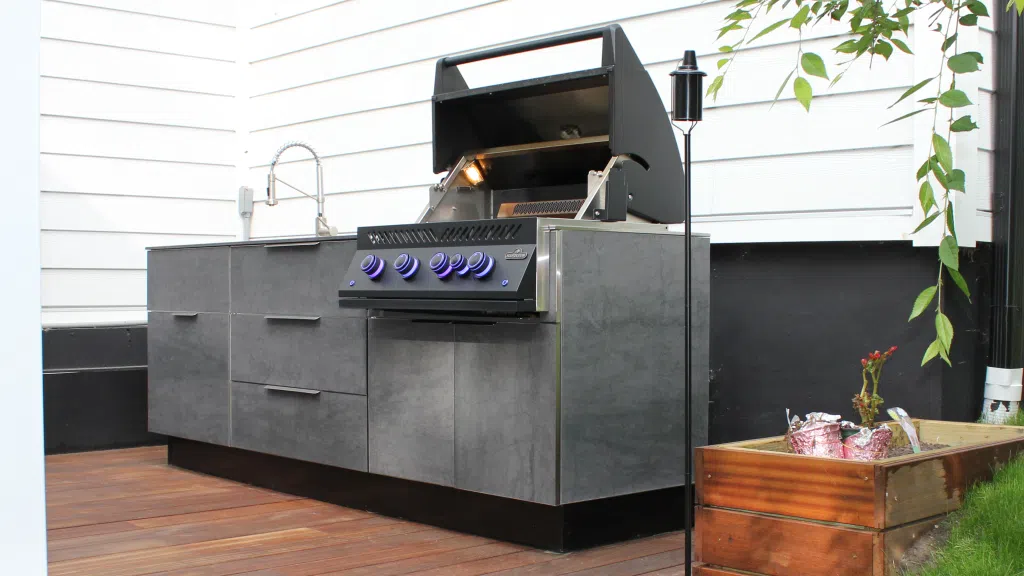
Can I see the kitchen in my actual backyard before I buy?
Yes. SKOL 360 uses augmented reality to place your design into your real space through your phone or tablet, at true scale. You can walk around it, check clearances, and see how the finish reads in your light before anything is manufactured. It removes the guesswork that comes with reading a flat drawing.
What outdoor kitchen layouts can I design?
SKOL configurations cover linear runs, loaded linear layouts with refrigeration and prep, galley kitchens for square or terraced spaces, and L-shaped kitchens that turn a corner into a destination. The named configurations, Denali, Sequoia, Yosemite, and Rainier, are starting points rather than limits; the modules combine into whatever your space and hosting style call for, and all major grill brands, pizza ovens, and smokers are compatible.
How do I design an outdoor kitchen to a budget?
Because the price updates live in SKOL 360, you can shape the kitchen to a number rather than discovering the cost at the end. Add or remove modules, change appliances, or adjust the layout and watch the effect immediately. For a plain-language look at what drives the total, see our guide to outdoor kitchen cost, and see how the cabinets are built on the cabinets page.
Frequently asked questions
A good tool lets you design with real components and see accurate pricing. SKOL 360 is a free 3D and AR tool that builds your kitchen from actual SKOL modules and finishes, shows it in your backyard through augmented reality, and prices it in real time, so the design reflects the kitchen you will receive.
Yes. In SKOL 360 you place modules, choose finishes and appliances, and arrange the layout yourself, with a 3D model and live pricing guiding each choice. Our team is available to help refine the design in a consultation whenever you want a second set of eyes.
Yes. Designing your kitchen in SKOL 360, including the 3D model and the augmented reality view in your own space, is free.
Start with your measurements, decide where cooking, prep, refrigeration, and storage should sit, then place modules into a linear, galley, L-shaped, or island arrangement. SKOL 360 shows the layout in 3D and in your backyard so you can adjust before committing.
Your real space measurements and a rough sense of how you host. That is enough to start placing modules in SKOL 360. You can refine finishes, appliances, and layout as you go.
Design your kitchen in SKOL 360
Free, in 3D, and in your own backyard through AR, with pricing that updates as you build. Or book a private conversation with our team.